
Skip to content
  • 630-935-7696
  • +372 669 2265
  • info@easystoneshop.com
  • Home
  • Features
    • Countertop Estimator
    • Job Scheduling
    • Smart Label
  • Pricing
  • Team
  • Blog
  • Tutorials
  • Contact
  • Login
  • Home
  • Features
    • Countertop Estimator
    • Job Scheduling
    • Smart Label
  • Pricing
  • Team
  • Blog
  • Tutorials
  • Contact
  • Login

© 2026

My Company

  • Employees
    • How to Add Candidate
    • How To Add Employees
    • How to Set an Employee as Discharged
    • How to Attach CV or Other Files to Candidate
    • How to Record Discharged Reason
    • Set Working Hours for Employee
    • Assign Multiple Employess to Activity
    • How to Add Candidate Contact Information
    • How to Evaluate a Candidate
    • Set a Birthday for Employee
    • Define an Employee Position
    • How to Add a Note for a Candidate
    • Define Skills of Employee
    • Set Employee Contact Information
    • How to Attach PIN-code to Employee
    • How to Define Overtime Rate for Employee
  • My Company Setup
    • How to Set My Company Profile
    • How to Define Tax Rate for My Company
    • How to Define Margins for My Company
  1. Home
  2. Docs
  3. My Company
  4. Employees
  5. How to Record Discharged Reason

How to Record Discharged Reason

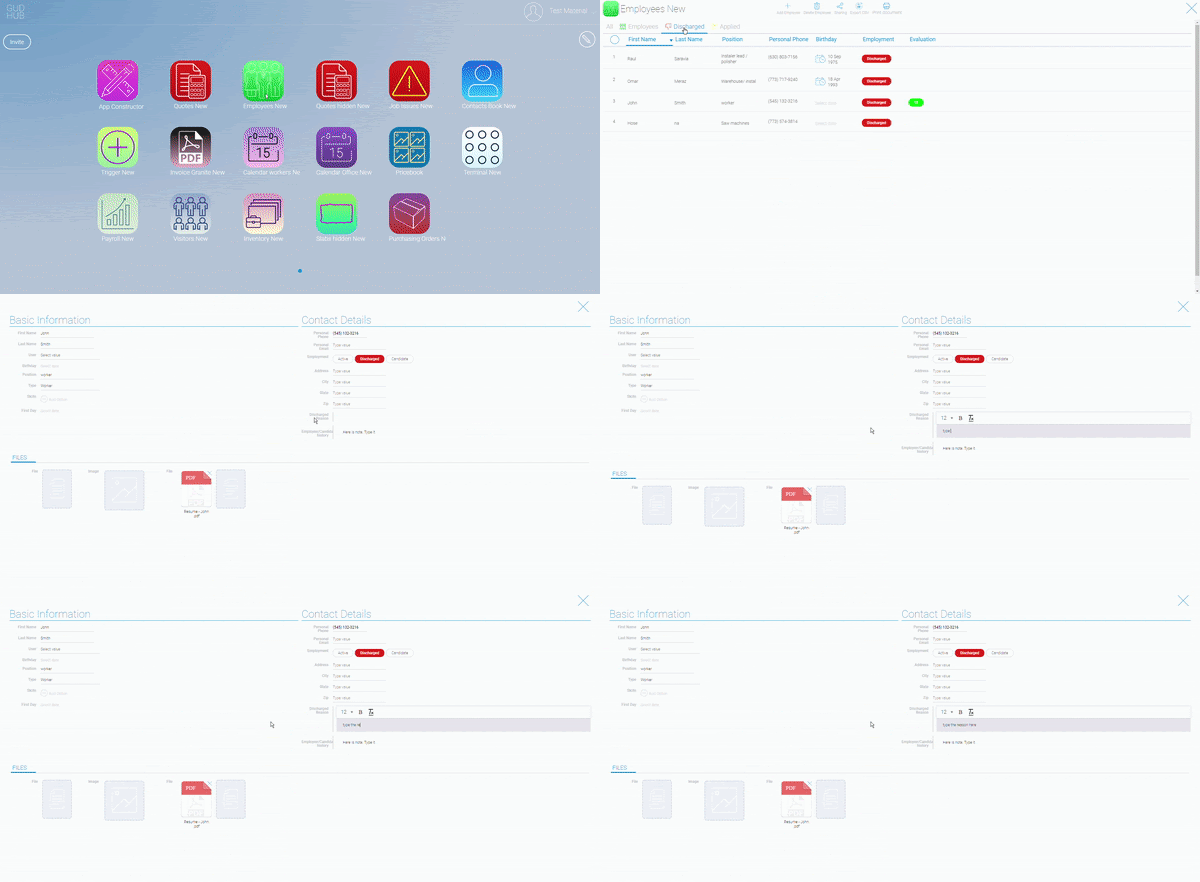
To notate the reason for the employees discharge follow these steps.

Step 1: Open the employee application.

Step 2: Select the employee that you discharged.

Step 3: Under the field “discharged reason” notate the reason for discharge.
Still stuck? How can we help?
Updated on 01.03.2021

Doc navigation

← How to Add CandidateAssign Multiple Employess to Activity →

How can we help?

107 Brook Ct, Bolingbrook, IL, 60440 Laisves al. 82 , Kaunas, 44250 Lithuania
(630) 935-7696 +372 669 2265
info@easystoneshop.com
© Copyright
Privacy Policy